Making a Choice with if
Until now your programs have done every line, every time. An if changes that. It asks a question about a number, and the code inside the brackets runs only when the answer is yes. This is how a program makes a decision.
💡 The idea
An if lets the program compare two numbers and act only when the answer is yes.
- if side > 60 [ colour red ] means: if side is bigger than 60, switch to red.
- You can compare with > for bigger, < for smaller, and = for exactly equal.
- The work that depends on the answer goes inside the square brackets.
- When the answer is no, the program skips the brackets and carries on.
- Put the if inside a loop and the answer can change from round to round.
📘 Words to know
- if
- do something only when a test is true
- condition
- the question an if asks
- compare
- check whether one number is bigger, smaller or equal
👀 Watch this
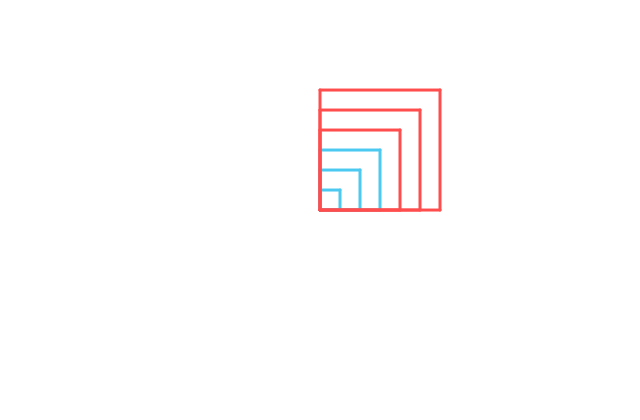
Six squares growing out of one corner. The ones bigger than 60 come out red.
set side 20
repeat 6 [
if side > 60 [ colour red ]
repeat 4 [ forward side right 90 ]
change side by 20
]
✍️ Your turn
- Run it and count how many squares turned red.
- Change 60 to 100 and predict what happens before you run it.
- Change > to < and run it again.
- Add a second if for a second colour: if side > 100 [ colour purple ].
- Try if side = 60 [ width 10 ] and see one square get a fat outline.
🎯 Challenge: Use both < and > so that small triangles come out blue and big ones come out orange.
Show me one answer
set r 20
repeat 6 [
if r < 60 [ colour blue ]
if r > 60 [ colour orange ]
repeat 3 [ forward r right 120 ]
change r by 25
]
Your program